Monday, April 11, 2011

Skip To My Loop Skirt

We had a birthday party to attend this weekend and it was so much fun! Cinderella made an appearance at the party, and S.R. was IN LOVE! She was Chatty Cathy once Cinderella walked thru the door. I really wish I had brought my camera:o/
Anyway, the Birthday girl needed a gift, and being the procrastinator that I am, I didn't have a gift for her. Saturday night I was racking my brain as to what I could make that would be super fast, but still be super cute...this is what I came up with:
This is 100% designed by me...if there is another skirt out there just like it, I promise I haven't seen it.
I came up with this particular design because I always have the hardest time judging how long to cut the elastic. Sometimes it's too small, sometimes it's too big, and every now and again it's just right...sounds like something out of the Three Little Bears, right?
The waist has button holes and a belt laced thru it. Problem solved:o) You can tighten or loosen to your heart's content.
S.R. was a little upset that she couldn't keep the skirt on for the party, but I had to remind her that we were giving it to her friend as a birthday gift. 3 year olds...I tell ya;o)
I will be making a pattern and tute soon, and it will be available in my Etsy shop.
***
In other news...I had a fantastic yard sale weekend. I will share with you guys my great finds in the next few days.

Participating in:


Funky Junk's Saturday Nite Special

Thursday, April 7, 2011

A new way to share local product availability with your customers

[Cross-posted from the Google Merchant Blog]

If you've ever spent your Saturday calling different stores or driving around town in search of one specific product, then it probably occurred to you that there must be a better way. Today we're announcing Local Product Availability on Google Place Pages - a new feature that automatically brings your offline catalog to the web, letting customers view your products and search your local inventory on your Place Page before visiting your store.

When you provide Google with local product availability data, your Google Place Page will now automatically include a new section, ‘Popular products available at this store’, featuring five popular products along with price and local availability. For shoppers unfamiliar with your business, this section shows the types of products available in your store.

If shoppers are looking for a specific item, they can click ‘Search within this store’ to search your product inventory to see if a particular item is in stock nearby.


Getting started
To automatically display local product availability on your Google Place page, you’ll need to first share local availability data with Google through a Merchant Center account and claim your a Google Place page. For instructions on sharing local product availability with Google, read this Help Center article. Learn how to claim your Google Place page here.

Posted by Paul Lee, Senior Product Manager, Google Product Search

A Dress, Some Fun, and a New Adventure


Yesterday I made this dress for S.R. I have been in sewing mode here lately and it's been so much fun!
She looked so sweet in it last night at church and had so many compliments.
I got to do something even funner than sewing yesterday as well (yeah, I know funner isn't really a word, but that's how much fun it was;o). I got to rearrange my friend's living room. She bought an ottoman, and didn't know where to put it. One thing led to another, and I ended up shopping her house and completely redoing her living room. It turned out so awesome! She was really excited about it as well. So if any of you out there need someone to come rearrange your house...I'm ya girl!;o)
In other news...
I finally bit the bullet and opened up an Etsy Shop...yep, I caved:o) I have fought the idea for a while now, but with the government furlough approaching, we might need the extra income...just in case. I only have a few items listed, but hoping by the weekend to get a few more up. Look over at the right side of the page and you will see some of the items I have for sale. Just click on the pics:o)
I hope you all have a fantastic weekend. I have lots of plans for the next few days.
See ya'll back here on Monday!

Google and Ink from Chase launch 5-city seminar series for SMBs

Every day we hear from business owners who think they need special skills to reach new customers online. Often they’re just overwhelmed by the seeming complexity of online marketing options. So they sit on the sidelines, eager to get in the game, but confused about where to start.

Sound familiar?

Google and Ink from Chase have teamed up this year to help small business owners get off the sidelines and into the game! As part of this commitment to helping small business owners, we jointly hosted the first Google-Ink from Chase ‘Grow Your Business Online’ event on March 15, 2011 at the JP Morgan Headquarters in New York City.

Over 200 Ink small business customers attended the program, living proof of how an incredibly diverse array of small business touch our lives every day - from chocolate shops to online gaming and private medical practices. The evening featured welcome comments from Richard Quigley, President of Ink from Chase, expert advice from AdWords evangelist Frederick Vallaeys on four ways for SMBs to market their business online and also included the Nuyorican Poets Cafe’s executive director, Daniel Gallant, talking about how online advertising helped their business grow.

One small business owner remarked that the tools and tips from Google experts on how to market small businesses online gave her “a new perspective of how to reach out to customers.” Another attendee found the Google Places page so compelling he went back to his business afterwards and “immediately verified my business’ Google Places page.”


Interested in learning more about how to get your business online? Check out our Small Business Online Marketing Handbook to get started.

Wednesday, April 6, 2011

Click. The AdWords newsletter: April 2011

 
The world has gone mobile. From smartphones to tablets, mobile devices are quickly becoming the best way for people to find products and services when they're on the go. Read on to learn about how you can take advantage of the mobile opportunity with AdWords and drive mobile customers to your business.

Happy reading!
The Google AdWords team

P.S. Have some feedback about this newsletter? Please let us know what you think.
In this Issue
APRIL 2011, VOL 2

MONTHLY FEATURE
A growing mobile opportunity

ADWORDS INSIGHT
Design a mobile-only campaign

SMALL BUSINESS SUCCESS
Bringing customers to the table

GOOGLE HIGHLIGHTS
Art Project

Your AdWords Account
  MONTHLY FEATURE
A growing mobile opportunity
In the past year alone, the number of Google mobile searches has quadrupled. In fact, by 2012, more people will connect via a mobile device than a computer.* How can your business benefit from this trend? Here are three ideas:

Make it easy to call you
People on the phone are looking for immediate answers. So it makes sense that many smartphone consumers call the businesses that they find after a mobile search. Encourage new customers to call you with AdWords Click-to-Call, which displays your business' phone number as an additional line of text on your ad. Google research shows that click-to-call ads drive a 6-8% average increase in clickthrough rates.

Make it easy to find you, too!
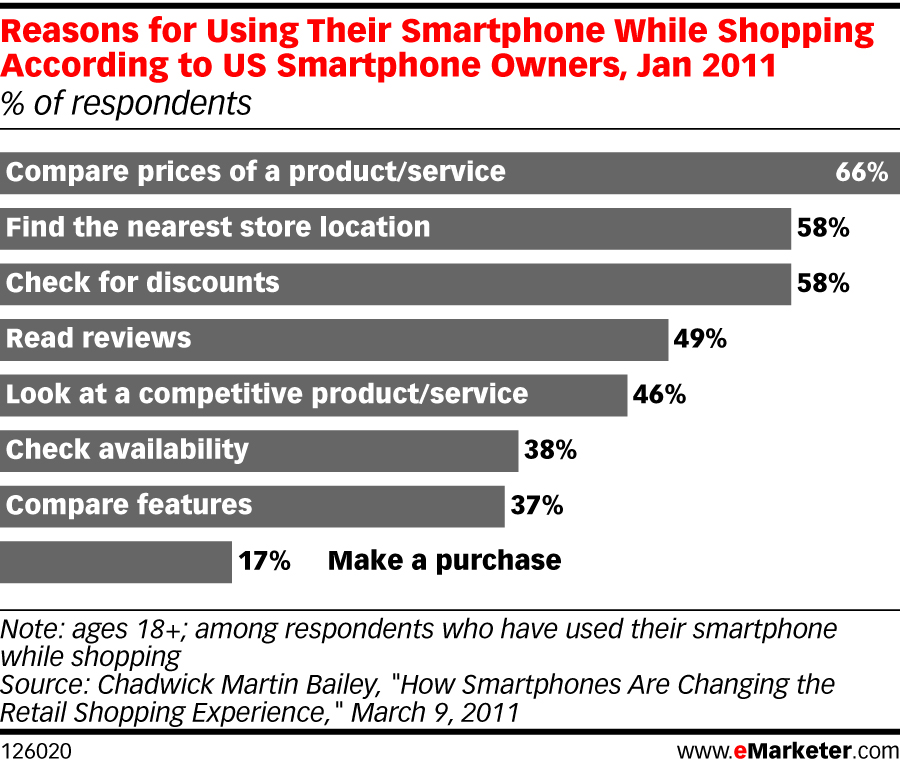
If you're a local business, mobile users are especially important, because one out of three searches on a mobile devices has local intent. And, according to a recent survey conducted by eMarketer, 58% of smartphone owners say they use their phone to find store locations. In AdWords, you can use Location Extensions to display your business' address and its location on a map. Once you have Location Extensions enabled, you can automatically take advantage of the new Hyperlocal feature. Hyperlocal shows your potential customers distance information, so they can see how close they are to your store!

Customize your ads for the mobile user
The eMarketer study also shows that people commonly use their phones to compare prices, find discounts and check product availability. Consider writing ads especially for smartphone users, keeping in mind what people want when they're on the go. You can actually create a separate AdWords campaign just for mobile. Check out AdWords Insight, below, for detailed instructions on how to do that.

ADVANCED TIP: What happens when someone wants to find out more about your business, and clicks to your website? Does your website load quickly enough for smartphone users? Take a few moments to see if your website passes the test. If it doesn't, there are a range of options to help you optimize your website for mobile devices.


*Source: Meeker, Mary; Morgan Stanley. "Ten Questions Internet Execs Should Ask & Answer." Business Insider.com, November 16, 2010.
  ADWORDS INSIGHT
Design a uniquely mobile campaign
Google Research shows that mobile-only campaigns help drive higher mobile clickthrough rates—11.5% higher on average. Why? With a separate mobile campaign, you can set the bids, budgets, keywords and ad text that work best for mobile customers.

  1. Create a new campaign in your AdWords account.
  2. Find the "Networks and devices" section in your Campaign Settings, and under "Devices" click "Let Me Choose".
  3. Un-select "Desktop and laptop computers," so you are only targeting "Mobile devices with full Internet browsers."
  4. Select keywords and create ad text with your mobile customer in mind.

  SMALL BUSINESS SUCCESS
Bringing customers to the table
Can your customers find you when they need you most? Roy's Restaurants shared the success of their hyperlocal mobile-only campaign: "Mobile searchers looking for dining options could effortlessly see how close they were to a nearby Roy's restaurant and the click-to-call function allowed for instant reservations." This campaign drove a 40% increase in calls, while the cost-per-click was 67% less than desktop ads. As a result, the campaign's overall return on investment was 800%—double the ROI of their blended mobile/desktop campaigns. Want to try it for your business? Learn about the strategies Roy's used.
GOOGLE HIGHLIGHTS
Picture this with the Art Project
Want to visit the world's most magnificent museums and masterpieces? Art Project, powered by Google—collaboration with 17 of the word's most acclaimed museums—lets you walk through museum wings to explore the world's most precious works of art. From Van Gogh's Starry Night to Botticelli's Birth of Venus, zoom in to discover striking details like brushstrokes and aging signs, all without leaving home.


Posted by Jenn Karakkal, AdWords Small Business Team

Batman Cape

Last Saturday was my first time out this year for yard sales. I was pumped and ready to go...but apparently those needing to rid themselves of unwanted junk were not of the same mindset. I only came across 3 yard sales near us:o( I found a few things, but nothing that you would call a "treasure." Anyway, the last yard sale I went to had a lot of dress up clothes, mainly for girls, but they did have a Batman mask. I snatched that up b/c I new that E would have a fit over it.
I was right:o)
So I thought  I would make him a Batman cape to match. I got busy making it yesterday, and I was so excited to show it to him.
He was really excited to see it...and then he put it on...
He said, "Where are the holes so that I can fly?" with utter disappointment. 
I apparently told him that I was going to make little pockets for him to put his hands in so that he could spread the cape out, but the way I made the cape, it wasn't possible.
He then told me that he didn't want it....my feelings were hurt:o( That is the very first time that I have made anything for my children that "FAILED".
 So who's wearing the cape, you ask? Why, S.R. of course:o) She even came in this morning with it on. She loves it, and doesn't care that she can't "fly" in it! It is the perfect size for a 3 year old:o) 
I guess I will be making a larger one with pockets/holes for flying. I will include a tutorial with that one as well. 

I hope that you all have a wonderful Wednesday!

Tuesday, April 5, 2011

Think with Google: Search Ads Affect Offline Sales, too

Do online search campaigns lead to in-store sales? Controlled studies we call ‘Online to Store’ experiments prove time and again that they do! Check out this video for results from large advertisers that tested the effects of keyword targeted products and categories, generic keywords and online coupons. Highlights include in-store sales lift, return on ad spend (15:1 in some cases) and halo effects on overall sales. Understanding the effect of search ads on offline sales is a large part of accurately defining the full value of search campaigns, beyond direct conversion. Consider these results and your own online to store testing.


Posted by: Susan Billingsley, Search Marketing Manager