Thursday, May 19, 2011

I've Been Featured at Knock Off Decor!

Great News girlies! My PB Knock Duvet is being featured at


So I can proudly wear this button for the SECOND time:o)


I am a lucky girl. Be sure to go check it out. Just click on either of the buttons, and you will see it:o)

In other news....I have a busy next few days ahead of me. I am having a Princess House Party at my house tonight. It was supposed to be last week, but we had only had our power back on for 3 days. So everyone was trying to get back to normal. Since it's so close to the end of the school year, everyone is packing everything into the next 2 weeks. Not many are coming tonight(sniff, sniff), but those who are coming will have a great time and some fantastic food:o)
I hope you have a great weekend! I'll be back Monday to share with you my weekend...it's going to wonderific:o)

Wednesday, May 18, 2011

Hundreds of ways to work smarter with Google Apps

Posted by Michelle Lisowski, Google Apps Team

Talking to our small businesses customers, we see they have a passion for what they do and a drive to succeed. On the Google Apps team, we have a passion for helping small businesses succeed by providing them with access to the same technology that large enterprises often have at their disposal. Google Apps offers small businesses hundreds of ways to leverage the power of the web to work more efficiently and focus scarce time and resources on getting ahead of the competition.

To celebrate National Small Business Week, we’d like to share a few of the ways that Google Apps is being used every day (we’ll spare you the time of wading through hundreds). And to make it even easier to get started on tasks such as invoicing and project planning, all examples provided are based on templates from the Google Docs and Google Sites template galleries.

Google Docs template gallery:

#1: Letterhead - Create a professional looking template for your outgoing letters and share it with others in the company. Print letters directly from your browser with Chrome.
#2: Budget planner - Easily build a 12-month budget spreadsheet that you can edit from anywhere throughout the year – no matter where your spending takes you.
#3: Invoice - Save time by creating invoices in a spreadsheet – totals are automatically calculated, and you can share them with co-workers to ensure accuracy and speedy payments.


#4: Customer satisfaction survey - Get feedback from customers and visitors about your product or service with a form. Easily analyze and graph the data.
#5: Business plan - Put your vision down in a doc. Share it with family, investors, banks, and others to get input and spread your ideas.
#6: Project timeline - Give others in your company insight into key milestones, completion dates, and other project details.

Google Sites template gallery:

#7: Intranet - Build an internal website where employees can access company news, employee training information, company policies, holiday schedules, and more.


#8: Project site - Centralize project information in one place. Display a team profile and key dates, and embed project docs and spreadsheets directly in the site.
#9: Team site - Create team rosters, schedule team meetings, and track progress of action items all in one place.
#10: Employee profiles - Build a community by creating profile pages where your employees can post their goals, internal resume, and internal blog.

The list continues but we hope this gives some idea of the range of use cases where Google Apps can help improve productivity for any small business. To learn more, check out some of our new resources including product videos and additional templates at www.google.com/apps/smb.

What Can Google Answer to Help You Grow Your Business?

Happy National Small Business Week!

On Monday, we gave you
five tips to empower your business with online tools and resources. Because it’s National Small Business Week, we’re also taking the time to reflect and find additional ways we can help businesses like yours. Online marketing and technology products may not central to why you started your business, but they can be central to growing your business.

In honor of National Small Business Week,
we want to answer your questions about online marketing and technology products designed for small businesses. We want to hear what’s on your mind about how you can use technology to start and run your business. Your question could be about using technology and online resources in general or about Google products and services specifically.

If you have something to share, head over to our
Google Moderator session where you can add a new idea or you can vote on ideas that have already been submitted.

We’re excited to hear from you and we hope you’ll take a few minutes out of your day to let us know what you’d most like to hear about from us. Just by sharing what’s on your mind, we get a better sense of what we can improve and where we can help make things easier and more efficient.

And if you haven’t already checked out some of our existing resources, take a few minutes to visit:

Tuesday, May 17, 2011

Click. The AdWords newsletter: May 2011

 
Your website is your face to online customers - are you greeting them at the door with a smile? Your site should engage with new customers, make it easy for them to find your product or service, and maybe earn you a little extra revenue. This month we share some quick strategies to help you get the full value from your website.

Happy reading!
The Google AdWords team

P.S. Have some feedback about this newsletter? Please let us know what you think.
In this Issue
MAY 2011, VOL 3

MONTHLY FEATURE
Make the most of your website

ADWORDS INSIGHT
You make the rules

SMALL BUSINESS SUCCESS
Maximize income

GOOGLE HIGHLIGHTS
Anatomy 101

Your AdWords Account
  MONTHLY FEATURE
Make the most of your website

You already know that an online presence is an important tool for building your business. Indeed, advertisers often ask us what they can do to improve their websites. We talked to some of the experts here at Google and they offered these suggestions:

Learn the basic rules of an effective site
Whether you're a tech expert or a novice, here are some simple design tips to help you create a compelling site:

  • Pass the 8 second test.
    A visitor should understand the purpose of your website within a few seconds.
  • Tell them what's in it for them.
    Highlight tangible benefits that potential customers can gain from your product or service. Will they be able to save money? Time? Buy a one-of-a-kind gift?
  • Use compelling images.
    Help visitors to your site take the steps towards making a purchase. Make those steps clear and easy to reach.

Don't guess... test!
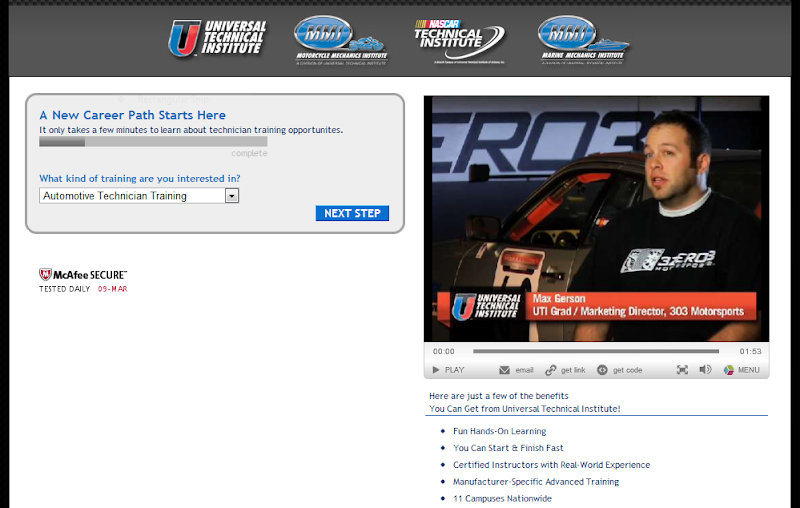
Which image or call to action will lead to more sales on your website? Free tools like Google's Website Optimizer make it easy to test different versions of your site and view the results. Can you tell which webpage version below performed better?

Website Optimizer Original Website Optimizer Redesign
Version A
Version B

Universal Technical Institute redesigned their website using Website Optimizer, and saw a 300% increase in conversion rates (read more).

Make extra money from your site
Your site's most important job is to promote your business and make it easy for potential customers get the info or product they want. But you can also make extra revenue by using Google AdSense to show relevant ads on your wesbite. It's free and quick to set up (you can even use your AdWords account to sign in).

  ADWORDS INSIGHT
You make the rules

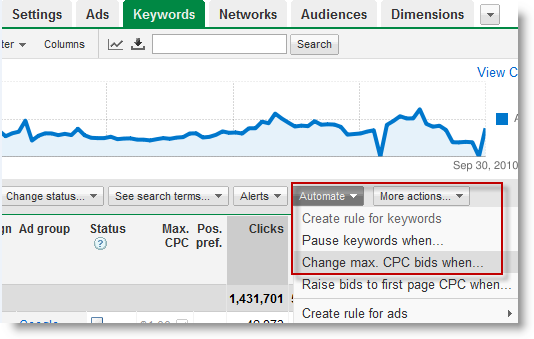
We know you're busy, so we've created a new AdWords feature to save you valuable time—Automated Rules. With Automated Rules, you can tell your account what to do in advance.

For example: you can set your budget to be higher on peak shopping days and lower during the rest of the week. You can also automatically change your bids for keywords based on their click-through or conversion rates.

Ready to try it? Visit our Help Center to watch a quick video about Automated Rules or to get detailed instructions with screenshots.


Set a Rule Now


  SMALL BUSINESS SUCCESS
Maximize income

TeAch-nology.com, a web portal for teachers, found a hidden source of revenue on their website. A longtime AdWords advertiser, founder Paul McKee noticed his ads showing on other education sites, and was impressed with how well the ads matched the content. He wanted to try showing ads on TeAch-nology.com as well, to explore how much revenue he could earn.

Google AdSenseHe tried Google AdSense, a free, easy way to earn revenue by showing relevant ads alongside online content.  McKee found that AdSense ads drove 8 times more revenue than other forms of contextual advertising did. AdSense now accounts for 50 percent of company income.

"We don't have a full-time ad sales team," McKee noted. "AdSense takes care of itself, allowing us to focus on running our business."

Read more about using AdSense to complement your AdWords account, and see if you can maximize revenue from your online content. Google AdSense

GOOGLE HIGHLIGHTS
Anatomy 101

Google body browserYou may be used to zooming in and out on Google Maps to discover the world around you, from a neighborhood park to a hotel across the country. With Google body browser, an educational tool from Google labs, you can explore the human body in the same way.

Start off with a clickable, rotatable, 3-d image of a person. Drag down the slider to see layers of the human anatomy revealed: muscle tissue, bones, organs and nerves. Wondering what that femur you broke while ice skating looks like? Use the search box, which lets you find and highlight specific parts of the body.


Posted by Jenn Karakkal, AdWords Small Business Team

Summer Printable

Summer break is just days away, and I wanted to give E the chance to hand out a little something special to all of his buds at school.
I stopped by Walmart and browsed their party section last night. There isn't much to choose from, but they did have these cute little guitar necklaces with bubbles inside. They are $2 for a 4-pack.
Here's what he will be handing out:


And if you are interested in this printable, 


then go 
HERE to download.
We are going to eat lunch with E today, and he really excited:o)
Looking forward to making his day!!!

Monday, May 16, 2011

Google's 2010 U.S. Economic Impact

(Cross-posted from the Official Google Blog.)

This week is National Small Business Week, an opportunity to celebrate the spirit and ingenuity of small businesses like Everblue, a start-up in North Carolina.

Everblue was founded in 2008 by veterans Chris and Jon Boggiano along with fellow entrepreneur Grant McGregor. The brothers’ goal was to make the U.S. more energy independent by helping people get certified in sustainable building practices. With old-fashioned hard work and some help from Google AdWords, their business has quadrupled in size. They now have 80 full time employees and instructors, and this year alone they’ll train tens of thousands of people—architects, engineers, electricians and others—to build smarter and greener.

Chris and Jon Boggiano, veterans and co-founders of Everblue, a training institute for sustainable building.

Today we’re announcing that Google provided $64 billion of economic activity to businesses, website publishers and non-profits in 2010. This is an 18% increase from the economic impact total in 2009. Here’s how it works: for every $1 a business spends on Google AdWords, they receive an average of $8 in profit through Google Search and AdWords.

We’re proud that Everblue and over one million American businesses use our advertising services to tell consumers about their products and services. Learn more at google.com/economicimpact.

Posted by Claire Hughes Johnson, Vice President, Global Online Sales

Celebrating small businesses and integrated, easy-to-use web tools


In honor of National Small Business Week, we’d like to take time this week to share ways that Google Apps and the Google Apps Marketplace can help small businesses work more productively and efficiently.
Today, we’re highlighting a few of the Small Business Web apps in the Google Apps Marketplace, and how our customers run their businesses on them every day. Google shares the Small Business Web’s dedication to providing tools that have enterprise-grade functionality, as well as align with small businesses’ priorities.

Apps that work together
Particularly for companies without a dedicated IT team or person, the list of necessary business tools can quickly become unmanageable. Web apps that provide deep integrations with Google Apps and with each other are especially useful for growing businesses that don’t have time to manage multiple, distinct applications.


Olark lets customers live chat with website visitors directly from the Gmail interface through Google Talk, and provides easy access to chat transcripts. Peter Macaulay of KitchenwareDirect.com.au says, “The ability to live chat with customers without leaving the Google Apps interface is a huge productivity advantage. The simple and elegant implementation meant we were up and running in a matter of minutes. Staff members are easily able to set their availability for chat, enabling them to easily multi-task.”


WORKetc is another app that makes Gmail into the front end workspace, but for CRM, project management, and customer support. It let’s you easily share emails related to particular projects with relevant team members without forwarding or copying other email addresses. D. Hogan of Varis Energy says, “Any emails that need to be shared with my team get tagged in the WORKetc gadget that is built right into Gmail. This immediately lets everyone else who is assigned to a project or lead have access to the new information from the received email.”


Access all the time
As compared to larger businesses, small businesses are even less suited to managing servers, and tend to have many employees on the road or in non-office locations. Accessing their data and documents from anywhere, on any Internet-connected device is a core benefit of using web-based tools like Google Docs. OfficeDrop digitizes paper documents to make them text-searchable in Google Docs.
Greg Skidmore of Belpointe Asset Management says, “Each month we send a box of paper files to OfficeDrop and have them scanned directly into Google Docs. If I have a document that I need scanned right away, I use OfficeDrop’s scanning software, ScanDrop, and upload it immediately.”


Easy to Use
Small business owners and employees often wear a lot of hats and they’ve asked for solutions that are easy to learn and use. Michael Bower of Michael Bower Digital says, “I always need to know where my money is, without wasting time organizing my paperwork. As my business grew, I was losing control of my cashflow. Both Google Apps and FreshBooks have just enough features to keep my workflow and invoicing organized, allowing me to focus on my work.”

These are just a few examples of the many Small Business Web app vendors in the Google Apps Marketplace who provide the functionality and integrations a small business needs. Over 30 Google Apps Marketplace apps have already joined the Small Business Web and declared their commitment to helping small businesses focus on what they do best. They include:


Finance
Bill.com
billFLO
EchoSign

Expensify
FreeAgent
Freshbooks
Harvest
Kashoo
Outright
Shoeboxed

CRM
Assistly
Batchbook
CRM

Capsule
CRM

Connect2Field
Disqourse CRM
Get
Satisfaction

PipelineDeals
SAManage
Solve360
CRM

Tactile
CRM

WorkETC

Doc Management
Box.net
FormLizard
OfficeDrop

Collaboration
MindMeister
Teambox
uberVU
YoolinkPro

Sales and Marketing
Mailchimp
Olark
SiteKreator
VerticalResponse
zferral


We celebrate National Small Business Week to recognize the importance of small businesses for promoting a healthy economy, and we’re excited to help them continue to grow and succeed through the smart use of technology.