Friday, March 11, 2011

Going Google across the 50 States: Arizona partners make their dream business a reality with help from Google Apps

[Cross-posted from the Google Enterprise Blog]

Editor's note
: Over 3 million businesses have adopted Google Apps. Today we’ll hear from David Marsh, co-Founder of The Standard Agency, a talent management and creative agency in Arizona. To learn more about other organizations that have gone Google and share your story, visit our community map or test drive life in the cloud with the Go Google Cloud Calculator.


Our dream business started at the kitchen counter, literally. My partner and I had been involved in the music industry for a decade and knew the framework for managing talent was broken – people are at extremes either bringing in tons of money or making close to nothing. So, we took a business idea that we developed at the kitchen counter and founded The Standard Agency to manage musicians, models, actors, athletes and other talent who need representation. We offer a one-stop shop that includes everything from design and online promotion to booking gigs. In working and collaborating on so many different projects we also found there was a demand to provide a deeper understanding and appreciation of how design and social media impact businesses. This caused us to expand to offer related marketing services to small businesses who need help establishing themselves online and offline.

Our business quickly went from an idea to a reality and to be able to immediately have professional email and other business tools through Google Apps was key. Knowing Gmail was part of Google Apps was a huge selling point for me as I consider it the best solution to keep email organized. Set up of Google Apps was quick and flawless and all the applications are easy to access from any device. I’ve worked with other companies that have had to jump through hoops to get email on their mobile phones. For me, Gmail automatically worked on my phone and it’s the primary way I access email. Plus, we don’t have constant downtime and servers to maintain as I’ve experienced elsewhere.

Google Calendar has been essential for scheduling and tracking timelines for various marketing projects. I don’t think my partner would have been able to use any other calendar out there. He’s far more efficient and productive because his calendar is easy to use and it syncs across his phone, laptop, and tablet.

When it comes to our extensive network of contractors and employees, most of whom live out-of-state, Google Docs is the cornerstone of how we work. We use Google forms extensively for everything from fan surveys to elicit feedback after events, to online resumes to collect information from new job applicants. We also create Google docs for almost everything including legal contracts which are common in our business. Contracts often go through multiple rounds of revisions and with a Google doc, the right people can access and collaborate on the most up to date version, no matter where they are.

If it wasn’t for the ease of use and low cost of Google Apps, I don’t think my partner and I would have taken off running as fast as we did. It created a strong sense of confidence and familiarity that we needed to start up our business. Two years later, we all use Google Apps daily and wouldn’t have it any other way.

Posted by David Marsh, co-Founder, The Standard Agency

Thursday, March 10, 2011

Party Outfit

This is what Miss S.R. will be wearing at the party on Saturday. This isn't what I had intended for the outfit to be, but I think it turned out really cute. The shirt was actually supposed to be a skirt, but I didn't make it right. I guess that's what I get for making something on the fly when little bit is down for a nap:o)
When she tried the skirt on, she hated it. So I thought, maybe I could put some straps on it and call it a shirt. Well it worked:o)
Can you tell I love ruffle pants?:o)
She just looks so cute in them!!
There is a possibility of some monogramming but we'll see how much time I actually have:o)
Lots of cleaning, hair cutting, and baking going on today. 
Have a great Thursday!!!

Wednesday, March 9, 2011

Free 'Thank You' Notes Printables

Mommies usually get left out when it comes to party favors. Let's face it, mommies get left out of a lot of things. They are the ones who go shopping for the gifts, get everyone dressed, and cart the little ones to the parties. So I want to make sure that they have a little something to take with them to show that we appreciate them making the effort to be at the party.
I'll share what's in them later on. I still want it to be a surprise for the mothers who will be attending:o)

I tried my hand at a little printable action yesterday.
These are the 'Thank You' notes that we will be sending out after the birthday party.
Are you impressed with my computer skills? This took FO-EVUH to make. Because I got no skillz.
You can download this FREE printable
And here are the 'Thank You' tags for the party favor bags.
To download these, click
The circles can either be cut out by hand or you can use a 2" circle punch to cut them out.
Let me know if there are any issues with downloading.
Happy Printing:o)

Tuesday, March 8, 2011

How To Make an Inexpensive Flower Arrangement

I told you all that I would share a quick tute on how to make these flower arrangements. You won't believe how simple and fast these are to make.
Here is what you need:

Flowers(obviously) I already had these from last years party.
Styrofoam Balls..these can be found at the Dollar Tree in a 2-pack
Container..mine came from Hobby Lobby and they were 67 cents each
Hot Glue Gun

First step..pop all the flowers off of their stems.
Next, place your Styrofoam ball into your container
 Glue your first row of flowers all the way around the perimeter of the container. If you want this to be removable, then place the flowers slightly higher and make sure that the glue doesn't drip onto your container.
Continue gluing until the Styrofoam disappears.
 And that's it! I told you that it was simple:o)
Here's a neat idea, and one that I was going to use, but decided not to...these arrangements could be used as place card holders. Just glue a name card to a thin dowel rod and stick it down in the Styrofoam ball:o) 

Stay tuned tomorrow for some free printables!!

Monday, March 7, 2011

Going Google across the 50 States: Google Apps proves the perfect choice for Mississippi creative agency

Editor's note: Over 3 million businesses have adopted Google Apps. Today we’ll hear from Rob Rubinoff, Interactive Director at Mad Genius, a branding and creative agency headquartered in Ridgeland, Mississippi. To learn more about other organizations that have gone Google and share your story, visit our community map or test drive life in the cloud with the Go Google Cloud Calculator.

Mad Genius is a creative fusion of branding, advertising, social media, HD video production, animation, media strategy, web design, web development, and more – a true soup-to-nuts creative agency. Each of these elements come together to create momentum-building ideas that drive results and help us stand apart from other agencies. Our clients range from national insurance companies to regional restaurant chains to local universities, and we have a talented group of people that help these organizations take their brands to the next level.

We started in 2005 as the offshoot of a film production company, and have been growing rapidly ever since. Two years ago, we landed one of the largest advertising accounts in Mississippi, which was a major milestone for us. However, it also meant that we had to move quickly to hire more people to staff the project. At the same time, we moved to a bigger office and started to re-evaluate the technology that powered our company. That’s why, as Interactive Director, I became a big advocate of Google Apps: the benefits of the cloud were what we needed.

We were originally using spotty POP3 email through our domain registrar, which was a legacy solution from when we were part of a larger company. Everyone had different versions of email clients, calendar, and other office software, and this created daily problems. There were times when we literally had to walk down the hall to schedule a meeting because we couldn’t share calendars with everyone in the company.

We talked to local IT providers who offered email solutions that would have cost us thousands of dollars. We also priced out our own Microsoft® Exchange server, which was not only costly, but also seemed like it would necessitate dedicated IT support. Everyone here already wears a lot of hats, so simplifying IT was essential, as was finding a powerful calendaring solution. What we needed was Google Apps.

Initially, there was concern that we might lose emails and disrupt operations during the switch to Google Apps, but we transitioned over the course of a week with no hiccups and continual access to email. Within another week everyone was used to the new system, and the office was thrilled. One of the immediate and tangible benefits came when our executives were able to access email from their desktops, laptops and mobile phones, with everything synced across each device.

Within the Google Apps suite, shared calendars have been huge for us; email and documents are icing on the cake! As we grow our accounts and expand our team (last year we opened a second office in Tampa, Florida), we need to be able to let people know what’s going on throughout the company, and Google Apps makes that not only possible, but also easy. We can view other people’s calendars, easily schedule meetings, and have created a half dozen shared calendars to track things like conference room reservations and vacation days. Plus, project management is vital in our business, and thus the ability to import iCalendar data into our project management system is key.

With Google Docs, we no longer send PDFs back and forth, which is a huge time saver, and we can brainstorm with team members in either office using a Google doc, since it’s basically like a giant shared notepad. We even use Google Docs to collaborate with clients and can elicit feedback and data in a format that is easily shared or uploaded into our system, avoiding data entry errors.

When it comes to groundbreaking agencies like ours, folks usually think New York, Los Angeles, Chicago; they don’t often think Mississippi. But the work we do is changing minds – and Google Apps is helping us get it done. We take pride in being innovative. We’re a young company, with passion for the work we do and a fresh approach to the way we tackle business. With our home base in Mississippi, our new office in Florida, and clients throughout the region, we need virtual speed. Google Apps has proven to be the perfect partner in keeping us connected and moving forward.

Posted by Rob Rubinoff, Interactive Director, Mad Genius

Inexpensive Party Decor Using Tissue Paper

Today I want to share with you some different ways to use tissue paper when decorating for a party.
When I started decorating for this Barbie Birthday Party, I noticed that the pink and zebra stripes were not exactly coordinating with my home decor:o)
I started taking everything down and realized that I needed to replace the artwork with something. That's when I came up with this idea.
Just cover up the existing art.
All you need is:
Good Tissue Paper(thick)
Sticky Dots, or other removable adhesive
Scissors
Ribbon
Craft Knife
And any other accessorization
 Start off by putting your adhesive along the entire edge of the glass. Lay your tissue paper down and smooth it out along the edges. Use your craft knife to remove the excess paper.
 And it should look a little something like this.
Quick side note, you can iron out MOST of the wrinkles in the tissue paper with an iron set on low, and no steam....do this BEFORE sticking it to the glass:o)
 Lastly, add any embellishments that your little heart desires:o)
The silhouette was created using my Cricut {love} and the Forever Young cartridge.

When the party is over, all you have to do is remove the paper.
How easy was that?
Another way to decorate with tissue paper is to make pom poms. Martha gives a great tutorial on how to make these.
And lastly, the "ceiling medallion"
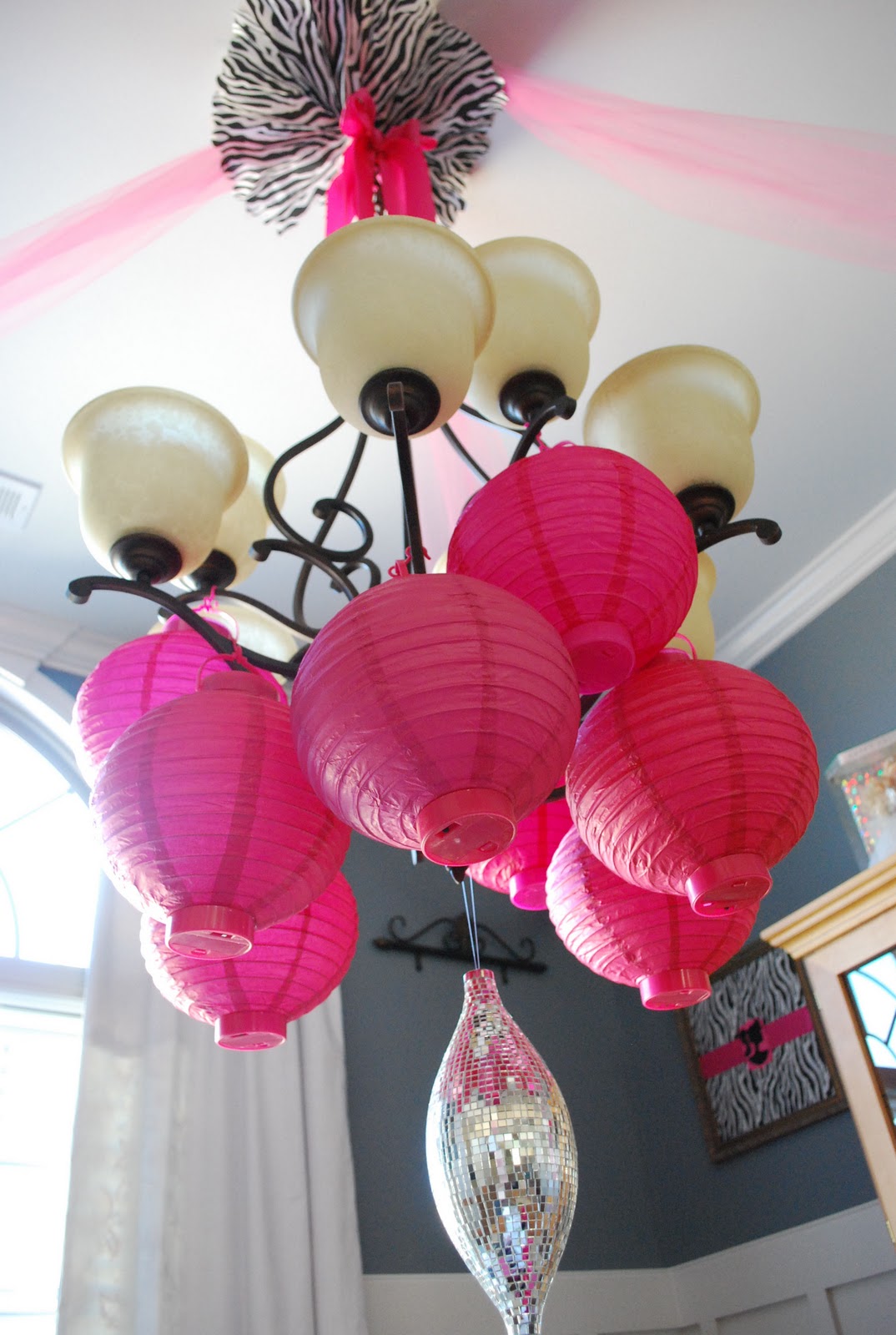
This only requires 2 pieces of tissue paper. You use the same fan fold as the pom poms, but fold them separately. Fan them out and tape the ends together. Then tape it to the ceiling. Add ribbon to the bottom to give it a more finished look.
Can it get any easier or cheaper?
Let me know how you decorate with tissue paper. I would love to know!!

Saturday, March 5, 2011

Barbie Birthday Party Decorations-Part 1

This is Part 1 of the reveal. Part 2 won't happen until after the party. We have had to post pone the party because S.R. has come down with a tummy bug:o(
Thankfully, all of her guests will still be able to attend next weekend.
So since all the decorations are up, I thought I wouldn't hold out in sharing with you all:o)
This is where the girls will be dining in style.
There are so many fun things that are going on here, and the best part is that I was able to keep the cost of decorating really low.
 These little mugs were a great find. They came from Hobby Lobby and they were only 87 cents a piece!! They come with pictures to color and you slide them inside. I just added zebra print scrapbook paper and their first initial:o)
Can I just say that I LOVE MY CRICUT!!!!
 The flower arrangements were really inexpensive, and super easy. I will be sharing a short tute on that soon.
 Do you all love decorating with paper lanterns as much as I do? One of the great things about paper lanterns is that they are reusable, unlike balloons. 
They were purchased from the Dollar Tree...Dollar Tree rocks!!  The "ceiling medallion" was made from tissue paper:o) 
What do you think about my disco ball? It is a Christmas ornament that I found on clearance.
Here's a quick tip...if your curtains don't match your party decor...flip them around backwards. Most curtains have white lining on the back...everything matches white, right?:o)
And some artwork. You won't believe how easy and inexpensive this was. Another tute for another day:o)
S.R. is really looking forward to sharing her special day with all of her friends....even if it's a week later.
Here are the links to the rest of the party:
1. Inexpensive Party Decor using Tissue Paper
2. How to make an inexpensive flower arrangement

Participating in:


UndertheTableandDreaming