Thursday, September 23, 2010

Pumpkin Painting

Another Bottle and Brush Creation. I went with  my friend Amy last week to paint these pun-kins. This picture is only 12x12, but it took FOE-EVUH to paint. There was a lot of shading and blending. I am happy with the end result though.
Still working on the mantle. Adding a little here and a little there. I can't believe that September is almost over. Time is going by too quickly. Starting to miss the lazy days  of summer, but I am definitely ready for some cooler weather:o)
A little close up:o) 
We started the Dave Ramsey envelope system on Monday. All I can say is WOW. It's harder than I thought it was going to be, but I am staying on track and realizing how much money I was actually spending...OUCH!
I am working on some curtains today for the dining room. They are just regular panels. Hoping to have them hanging this evening before I head out to Bottle and Brush AGAIN. There is a painting that I have been dying to paint and the artist is demonstrating it tonight, so I HAVE to go:o) It's imperative:o)
Have a great Thursday!!

Linking up to
tatertots and jello

Wednesday, September 22, 2010

How to edit Google Maps and local business listing data

[Cross-posted from the LatLong blog]

The world is a big place that’s constantly changing, so in digitally replicating it on Google Maps, you can imagine how much information we’re working with. We get data for Google Maps from a number of sources, including third party providers, business owners and users like yourself. And while for the most part, our algorithms do a great job of accurately reflecting the real world on the map, there are some instances when we get it wrong.

If you notice something that’s incorrect on Google Maps, chances are it’s either an issue with our map data - things like city and road names - or with our business listing data. We have a number of simple tools that make it easy for you to correct or report any issues so that we can get the maps right. Your assistance helps us provide the most accurate and up-to-date maps possible, so you and other Google Maps users can find what you’re looking for and be on your way.

Report a problem with our map data
  • Use the Report a Problem tool in the U.S. and Canada, most easily accessible by right-clicking on the map or clicking the link on the bottom right-hand-side of the map.
  • If anything with our map data is wrong, such as a road being renamed or a new highway on-ramp opening up, please submit a report. We work hard to fix the map based on user submissions, and try to resolve these issues as fast as we can.
  • Countries outside the U.S. and Canada should contact the Google Maps data provider to correct the information.

Edit business listing information directly on Maps
  • If you see incorrect information appearing on Google Maps listings in the U.S. (and many more countries), you can make updates to listings directly on Google Maps.
  • Once we've reviewed your edits, updates to the listing will go live within several hours.
  • If you are the business owner but have yet to claim your listing, see below for more information about Google Places.

Report incorrect business listing information
  • The best way to report incorrect information is to use the “Report a Problem” tool, where available. Report a Problem allows you to specify exactly what is incorrect about a listing.
  • Once these user-submitted reports are reviewed, updates to the listing will go live in a few weeks.

If you’re a business owner, you should also claim your Google Places listing so that you can edit and update the listing that appears on Google, Google Maps and GOOG-411. Verifying your free business listing allows you to not only ensure that accurate information appears on the Place page for your business, but also enhance your online presence by adding photos, videos and even real-time updates like weekly specials to your Place page.

Claim your Google Places listing
  • Claim your Google Places listing by adding it at http://www.google.com/places or by clicking “Business Owner?” on the Place page for your business.
  • Verify your listing by PIN (postcard or phone). Within an hour, click the “See your listing on Google Maps” link in your account to see your listing’s Place page.
  • If incorrect information is appearing in your listing, there are a number of different ways to let us know and get the information corrected.

Posted by Brianna Brekke, Senior Strategist, Google Places

Tuesday, September 21, 2010

Bible Cover Tutorial

I have been dying to have a Bible cover for the longest time, but have never gotten around to making one. I always have a thousand things on my to-do list and never remember to make a Bible Cover until I am sitting in church. Well I finally took the time to make one during nap time. I already have one, but it's store bought, and boring. I wanted something a little more flashy...sounds like something I really need in worship...huh?;o)
Anyway, I thought I would put together a tute for any of you who might want to make one of these yourselves.
Here's what you need:
1/2 yard of fabric
Double Fold Bias Tape
Thread
Low Pile Batting
Velcro
My Bible measures at 15"x10". When I decided to make this cover, I wanted to make it as simple as possible. I only have a short period of time to work with since nap time is getting shorter and shorter these days:o)
Here's the break down of how to assemble the cover
Cut your fabric according to the dimensions of you Bible.
You will need:
 2 Large rectangles (front cover and inside cover) size will depend on Bible measurements
1 rectangle cut to size of covers from batting
2 straps measuring 4"x 22"
2 pockets. My pockets were 10 1/4" tall by 4" wide
2 -3 1/2"x10" rectangles for enclosure
You will need to sandwich the batting between the two large rectangles, right sides facing outward.
Now I never pin anything together b/c I am lazy, and I have lost a lot of machine needles from sewing across pins. But for this, I did pin. Only because when quilting, the fabric will move and nobody wants to take the time to pick out all those stitches:o) So starting from left to right pin the fabric in place, and make sure the fabric is laying flat, and that there isn't any bunching.
Now quilt. I kept my seams about an inch and half from one another. One tip to remember when quilting. Roll the fabric up, so that it's easier to feed the material thru so that you can keep a straight stitch.
When you have sewn all your squares, there will be some fabric that is hanging over, like the picture below.
Trim that off. You want all the edges to be the same.
Next you will want to prepare the straps, pockets and the enclosure. For the straps, just use your iron to press it into place.
Fold in half length wise. Press.
Fold the outer edges in and press.
Sew a seam as close to the edge as possible but making sure to catch all of the fabric.
The pockets for the inside of the cover will need some bias tape. All you do here is open the bias tape up, and slide the raw edge of your fabric inside and stitch.
The enclosure is simple. Place right sides together. Run a 5/8" seam around the two long sides and one short side, leaving the other short side open.
Trim corners off
Turn right side out and press.
Now it's time to put everything together. You will want to line everything up where it's supposed to go and use a basting stitch to hold it all in place. So much easier than trying to pin everything:o)
(A basting stitch is the one where the stitches are wider and further apart)

Time for the bias tape. Now I tried using a 1/4" wide tape,and boy was that a mistake. I ended up using a 1/4" tape on the pockets and a 1/2" tape on the outer edges. Do it the same way you did the pockets, just open it up and keep all raw edges inside the tape. The corners are a little tricky so go slow there:o)
And here is the finished product.
I didn't put the velcro on until the very end because I needed to see how far the enclosure would overlap. I used the bow and button to cover the stitches from the velcro.
I love that the straps are long enough that I can carry it on my shoulder...now I have my hands free to carry little ones or their treasures from Bible class:o)
Let me know what you think...I am really digging this:o)

Strengthen your advertising strategies with the Train & Gain challenge

Fall is Fast Approaching...

even though it doesn't feel like it!!!
I want to pull out my long sleeve shirts....come on weather!!!
My babies want to roast "smarsh-mellows."
Speaking of my babies....my little man is 4 today. He's getting so big! He got in bed with us this morning, and when I was finally able to open my eyes without them rolling right back into the back of my head, I said Happy Birthday boy. He got the biggest grin on his face and a look of accomplishment. It was like he had "graduated." He is so proud to finally be 4:o) He is so sweet. I am making cookies for his class tomorrow to celebrate with his school buddies. We'll see how that goes. The dough is on the counter trying to reach room temp.:o)
We made thank you notes last night, and that was a sight to behold....weeping and gnashing of teeth. E knows how to write his name, but he likes to change things up a bit by not writing the letters in the correct order. So that was an ordeal. We finally got his name down 11 times. I worked on the fronts. Real simple. Here they are:
I got the cute little cowboy here. It is a really cute website with all these FREE printable downloads. I just inserted the "Much 'O'bliged"(I realized just yesterday that it isn't 'A'bliged). I cut it out along with a 2" wide strip of scrapbook paper and just stuck them to a card. Simple.
Now for some fall love.
I had a "feeling sorry for myself day" a few weeks ago. When I feel sorry for myself, I have to go out a buy something crafty and work hard so that I feel better about myself...it's sick..I know:o)
I went to Hobby Lobby...imagine that:o) I started looking at all of their fall wreaths and I couldn't believe how expensive they were and how unimpressive they were too. So I bought leaf garland, (2 different types), and a few other add ins and decided I was going to make one for myself. I had a wreath form that I purchased at Dollar Tree...not the foam kind, the other kind...not sure what to call it...I have some baskets made of this same wood like substance. 
Anyway, I got out my glue gun, and an hour later I had this
for slightly over $30!!! Beat that Hobby Lobby;o)
I LOVE this wreath. I thought about entering it into the Cultural Arts fair the other day, but didn't want to part with it:o) The hubs can't understand why I am decorating for fall when it is still almost 100 degrees outside....I say b/c I can:oP
The 'W' was purchased from H.L. and I just slathered Mod Podge on it and smothered it in glitter. LOVE!
Hoping to share a few more Fall projects the rest of the week. I am not feeling super motivated right now, so I can't make any promises;o)

Participating in:

Domestically Speaking

Monday, September 20, 2010

A more secure cloud for millions of Google Apps users

[Cross-posted from the Google Enterprise Blog]

Friday, September 17, 2010

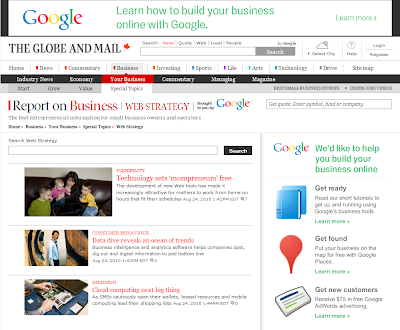
Google and The Globe and Mail Launch "Web Strategy" Resources for Canadian Small Businesses

According to Statistics Canada, 98 percent of Canadian businesses are considered small, and they employ close to half the country’s private sector workforce. Given that metric, it's obvious that a healthy and vibrant small business sector is essential to Canada’s economic growth.

With the proliferation of the Internet, it’s easier than ever for entrepreneurs and small business owners like you to reach new customers, promote your products, and access new markets in ways that only large corporations could manage in the past. For example, powerful and intuitive online applications such Gmail, Google Calendar and Google Docs can help you slash IT costs and enable your employees to collaborate more effectively.

To further this movement towards taking advantage of online resources, we're launching a partnership with The Globe and Mail to help Canadian small business owners and entrepreneurs expand their Web presence and use the Internet to boost sales and long-term growth. The Web Strategy section on The Globe and Mail website will bring together Google's knowledge of business in an online environment with The Globe and Mail’s insight into strategy and economic issues. The site will feature information and stories for small businesses, as well as provide tutorials about how to get started with Google’s many business tools, including Google Places and AdWords.


In the coming weeks, the Web Strategy page will explore topics such as how the Internet can transform the ways you reach new customers and how you operate your business. If you have suggestions or questions, we would love to hear them. Click here to use Google Moderator and start sharing your ideas with us.

Posted by Brett Willms, Canada Marketing Manager