Saturday, March 3, 2012

Happy Birthday S.R.!!

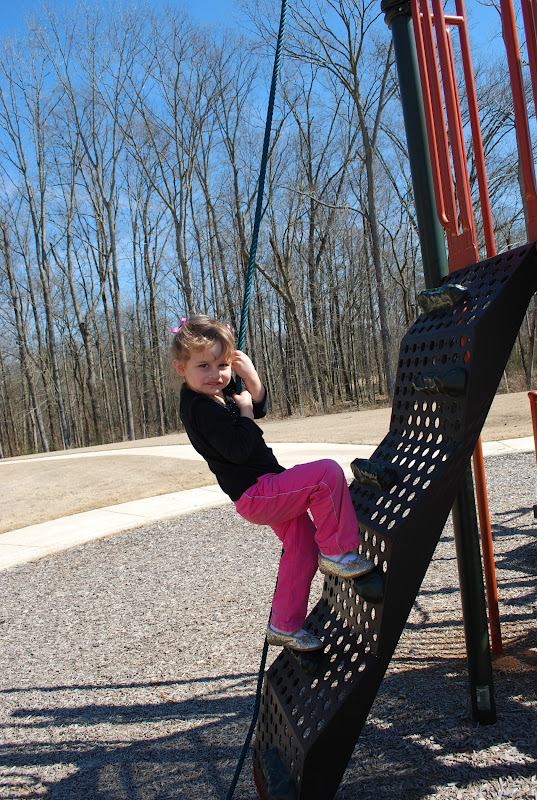
We have had a wonderful day today. Looking forward to sharing all of today's festivities with you guys. I wanted to show the birthday girl in her party attire...


We are so lucky to have this sweet thing in our lives...
Happy Birthday S.R.!!!

Friday, March 2, 2012

Sneak Peaks...

As promised, I am sharing a few sneak peaks from S.R.'s birthday party.


I just finished decorating ruby red slipper cookies. I have a few finishing touches with the party decor, and then I have to start scrubbing the house.
Some of our party guests will be arriving tonight.
I can't wait to share the entire party with you all. Have a great weekend everyone!!!

Thursday, March 1, 2012

Dr. Suess' Birthday on March 2nd....


If you guys are in need of a Dr. Seuss idea, you can check out my post from last summer where I made
 Thing 1 & Thing 2 t-shirts for the kids.
Comes with free printable & tutorial!!

Tuesday, February 28, 2012

Vintage Pillow Case Dress

I thought I would share a dress I made today. One of the outreach programs for our Homemakers' club this year is to make Pillow Case Dresses for the Little Dresses for Africa program.
We needed a "prototype" to show at the county board meeting, and I was asked to make one. I had this beautiful vintage pillow case just hanging in the closet, and I knew it would be great for the demo dress & perfect for my S.R.
 The needlework on the bottom of the dress is all done by hand...it's beautiful!
 Instead of tying a bow on either shoulder, I decided to go with the "less-fuss" approach, and go for the one shoulder bow.
I can't wait for S.R. to wear this dress.
She squealed when she saw it. Hopefully that same enthusiasm will be there when spring arrives;o)

Check out your new image ads from the AdWords Display Ad Builder

(Cross-posted on the Inside AdWords blog.)

Image and video ads on the Google Display Network can have a strong impact on the success of your online marketing campaigns. These ads convey your messages in more engaging and memorable ways, enticing viewers to buy what youíre selling.
The Display Ad Builder tool within AdWords already lets you easily create image and video ads for free and gives you the flexibility to customize these ads to suit your needs. Check out these image ads for examples of what you can create:


But today weíre announcing a new feature that essentially builds your image ads for you.
The Display Ad Builder now automatically creates suggested image ads, using the existing text ads in your campaign.
  • Click on the suggested ad that you like best.
  • If necessary, customize any fonts, text, or colors that need tweaking.
  • Then incorporate the ad into one of your ad groups. Itís that simple.
Check out your suggested ads now>>

You donít even have to be in the Display Ad Builder tool to use this new feature.
  • If youíre in one of your ad groups, you can select an existing text ad and under ìMore Actions,î choose ìGenerate Display Ad.î
  • AdWords will create an image ad based on the text ad you selected.

If you want to create your ad from scratch, you can always choose from hundreds of template designs.
  • Add your text and customize the fonts, colors, and background.
  • Choose images from the AdWords stock gallery, from your computer, or straight off your website.
  • Review the ad in all formats to make sure it looks right, then add it to your campaign.
For more information about Display Ad Builder, visit the Display Network website.

Posted by Lauren Barbato, Inside AdWords crew

Taking a Minute to Breath...

This winter has been one of the strangest I can remember. It has felt like spring most of the winter months. It's been great for the kids because they have been able to spend a lot of time playing outside with our neighbors.
Yesterday, I decided I needed a break from all of the insanity that has been going on here lately...lack of sleep, and trying to catch up on that..homemakers club stuff...and then there is a certain someone's birthday coming up on Saturday as well:o)
Our neighborhood is nestled in beside a river, and there is a nice paved path and picnic tables there as well.
So we grabbed the wagon, some food & the dog and headed down to the river and had a wonderful little picnic.
I sat back, snapped pictures, and enjoyed just watching my children...just watching:o)

 E being silly, and S.R. mad because he "bonked her head."
 Flowers that S.R. picked for me
 Sweet smile

 Throwing rocks into the river

 Scosche waiting patiently as we eat in front of him:o)
 Sticks make great toys..E has a "gun"..go figure;o) And S.R. has a "smiley face."
 There is also a little playground beside the pool house, so they absolutely wanted to play on that.
 Our "Monkey" on the monkey bars...they both can cross them, and I love the look of accomplishment they have on their faces when they do!
We had a great time, and it was nice to take a moment and just breathe.
Now that our school week has officially started, it's time to hit the ground running, and there won't be any "breathing" until after the party Saturday:o)
I have a few sneak peaks that I will share with you guys as teasers throughout the week, so stay tuned!


Monday, February 27, 2012

Google+ page stories: King Arthur Flour

Editor’s Note: This is the third in a series of posts about small businesses on Google+ and their tips and tricks for managing a great page. Visit our YouTube channel to see all the videos in this series and join the discussion on the Google+ Your Business page.

Meet King Arthur Flour, America’s oldest flour company. Founded in 1790, King Arthur Flour is now an employee-owned company that offers everything from baking products to educational baking programs—all with the mission to “inspire, educate and bake.” PJ Hamel, King Arthur Flour’s resident writer, shows how Google+ helps the company share the joy of baking with people all around the world.


As we mentioned the other week, Google+ Pages helps you share relevant content to your stream with the right people using Google+ Circles. PJ Hamel, King Arthur Flour’s resident writer, uses Google+ circles to share certain recipes with specific groups of interested customers.


Here are some more tips for sharing to your stream:
  • Share visual content. Add photos, videos, or links to your posts. Simply drag the photos, videos, or links directly to the share box. To add a link, just find the icon that's next to the URL in your browser window and drag it to the share box.
  • Grab someone’s attention by mentioning them in posts. Say you’re creating a post based on a user’s question, or you want to respond directly to a customer in the comments. To really grab their attention, try “plussing” (or “mentioning”) them in your post or comment. This will alert the customer to your comment, and bring them back to the post. To mention someone:
    1. Type +[person's name] or @[person's name]. (You can also type their email address instead of their name.)
    2. As you type, an autocomplete list of people will appear.
    3. Select the person you want to mention.
  • Add style to your post.
    1. Use underscores to italicize. _ italics_ → italics
    2. Use asterisks to bold. * bold* → bold
    3. Use hyphens to strikethrough. - strikethrough - → strikethrough
Want to learn more? Visit the Google+ Your Business site, and stay tuned for more Google+ stories and tips from small businesses. You can also watch all our Google+ page stories on YouTube.

As you share to your Stream, what kinds of content have you found are most engaging with your followers? Join the discussion on the Google+ Your Business page and tag your posts #mybusinessstory.

Posted by Evelyn Lee, Google+ Pages Associate Product Marketing Manager