Tuesday, February 1, 2011

Yesterday I got a wild hair and decided to reorganize my craft closet room. I use the guest room closet to store my fabric and what-nots as well. It is conveniently  located across the hall from my craft room. Makes for easy access. 
While throwing out tons of unwanted items, I ran across a bag of scraps. Lo and behold I found this fabric. In it's former life it was a window valance. I bought it from Bed Bath and Beyond several years ago and made a purse out of it. I completely forgot about the leftovers.
Is this not the cutest dress?
 The denim ruffle was already attached at the bottom. I just sewed a side seam  and a seam around the chest to hold elastic. I then made straps and added in the leftover ruffles. This dress took around 30 minutes to finish. I wish all of her dresses took this long to make;o) I have a few more outfits in the making. Can't wait to share them with you all once they are completed!
In other news, today is our 8th wedding anniversary! Time has surely flown by. Happy Anniversary my Love!
***
Don't forget to place your vote for your favorite project at Crafting with the Stars. Voting ends tonight at10 p.m. MST 

Monday, January 31, 2011

Fabulous Weekend


I hope that you all had a wonderful weekend...we sure did. Our anniversary is tomorrow, so we spent the weekend in Pigeon Forge and made our way up to The Biltmore in Asheville, N.C. The weather was perfect! And the company wasn't all that bad either;o) We were definitely inspired by all of the beautiful gardens, even though most of the plants and trees were dormant. 
The hubs is ready for spring to get here b/c we have a massive back yard that needs some attention.
We stayed at the Inn at Christmas Place. It was reeeeally nice:o)
We definitely want to take the kids there. They have milk and cookies with Santa every night, and on Saturday nights Santa performs:o) So cute!
On our way back home, we stopped by the knife shop. The hubs has to stop by there every time we go up there. While he was perusing the knife cases, I headed to a small little corner where they were selling dulcimers.
Just so you know...I am going to be purchasing one of these in the VERY near future. The little man who was behind the counter was so sweet and he played for me:o) I love the sound that a dulcimer makes. He said that they harmonize beautifully with a guitar. It just so happens that my handsome hubby plays the guitar:o)
Ebay, here I come!!
So anyway, today will be a day of recovery from the long weekend. Doing a little laundry using my NEW washer and dryer..WUURD! And then just sitting in front of the tv with my babies. I'm so glad that E has pre-school on Tuesdays:o)
*****
Make sure to head over to SEW DANG CUTE for round 2 of Crafting with the Stars. This round's challenge is Decoupage.  Vote for your FAVORITE 3!
Happy Monday!!! 


Friday, January 28, 2011

How To Improve your ALEXA

How can you increase your Alexa rank? Alexa is a ranking system based on the level of traffic a website receives from people with the Alexa toolbar installed.And here's the tips for you.

You may want to increase your Alexa rank because advertisers, ad networker's use it as a gauge to determine the popularity of your blog. So if you are someone who is making money from advertising, you would definitely want to increase your alexa rank as it helps you bargain for an ad price. Sites like reviewme.com determines review price based on your Technorati rank and Alexa rank.


Increase Alexa Ranking

1. Download Alexa toolbar free. If you are using Firefox, I recommend you to use another plug-in called Search Status which not only displays the Alexa rank but it also shows page rank details, no follow links, meta tags, keyword density of a page etc. in this category you'll find more intuitive toolbar,you can manage your blog/site with this tool.also you can find some social media link button so you will helpfull if you are social community lovers such as Facebook or yahoo groups, this will manage your time than you must write any social address link in your search bar.

2. Put an Alexa rank widget on your blog. Each click will be counted as a visitor.
In this category Alexa will help to increase your rank in every single click to your blog will be counted as a visitor.Even your not opening your blog in full mode this will count as a visitor too. e.g your opened your blog in just 10 second this will counted.

3. Encourage your friends or colleagues to use Alexa toolbar. 
 Explain them to put the tracking system of the toolbar.Ask them to rate your Alexa website profile.with this tricks your site or blog will have a personality and trusted.This helpfull to promote your site and have colleague feedback. More readers will come if they seen you have trusted site with others.Good rating will increase you siterank easily

4. Try to get digg or stumbled. 
 This will bring massive amount of traffic to your site and contributes a lot to your Alexa rank. Traffic absolutely pointed to make your site popular and visible.More traffic more rank so get digg , stumble, social media, news site, groups and forum will brings you more traffic don't forget their popularity, they have thousand visitors daily.

5. Write content related to webmasters. This is because most of the webmasters use Alexa toolbar.


You may write and post articles related to SEO, webmaster tools. Webmasters always look for new tools and may revisit your website to gain access to the tools. Promote your articles on webmaster forums and social networking sites. Just keep in mind great article will bring more readers to your site, so making a good quality content is a must.

if you have trouble on how to writing article content,this small tips maybe helpfull.Do what you can do,if you love in gardening and know_how_to_do something about it, this "how_to" idea is your goldmine.

6. Buy links and banners from webmaster forums. A well displayed ad can bring lots of webmaster traffic to your site and boost your rank. But you need to have unique and good content on your blog to attract more and more visitors.

This cost not cheap! some easy tricks if your'e not yet using Google Adsense in your site, you can make your own banner to promote it in traffic media. you can signing as an free member on Trafficswarm, Easy Hits4u or another PTC Site.

Generate your credit by doing the job and convert it with your banner site or your link site this will brings you traffic. Trust me ,with this small tips you will have skill and experience to manage your site,it simply worth it when you spent 1 hour to go deeper in trafficswarm or Easyhits4u .This will blown your mind on marketing strategy,i know the marketers who failed and spend $100 daily to bought traffic and he got nothing, just traffic it self and no experience.

7. Write about Alexa and post in your blog.

Bloggers love to know about different ways of increasing their Alexa rank.This may eventually increase traffic and your rank. Just like what i say on top,Trusted site will brings more quality and loyal readers to your site.

8. You may try Alexa autosurfs for a new site or blog. They may work for new sites having almost zero Alexa rank. But they are not a long term solution.

In any conditions forums like Yahoogroups will helpfull to find more source about traffic,you can adding any questions too this will help .Using some old trick like put your linksite in your body email everytime you sent to your partner or friend will works. All you do is making a point that your link site is not an affiliate link, trust me they will open it!!

And that's how to improve your Alexa, any new tricks? come on, let me know it from you....

Wednesday, January 26, 2011

Tips for creating a free business listing in Google Places: Adding useful descriptions and relevant categories


(Cross-posted from LatLong)

With this blog post, we’re concluding our three part series about the Google Places quality guidelines. Today, we’ll discuss how to choose the best fitting categories for your business listing as well as how to provide a useful description. In case you missed the first two blog posts, you can find here the first post about business titles and here the second part about business types.


Adding useful descriptions

As a business owner, we encourage you to add a specific description of your business in the “description” field. This gives potential clients more information to understand what your business is about and see if your business matches what they are seeking. You can also use this field to provide further guidance about the location of your business which might be useful in some cases where it is hard to find, e.g. if the entrance of your business is only accessible via the rear.

Keep the description clean and concise, so it is helpful to users and catches their attention. A series of repeated keywords or categories may turn off potential customers, but a crisp and catchy summary of the services you offer help users determine if your business is right for them.


Choosing relevant categories

If you provide appropriate and accurate categories, we can better match your business listing to relevant user searches. We recommend choosing specific categories that describe the core of your business well instead of broad ones. A good way to find representative categories for your business is asking yourself the question “What is my business?” Be sure to capture what your business is as opposed to what it offers or sells - in that sense, “bakery” would be a good category as opposed to “cakes” or “bread”.

Also, do not include location information in the categories field. If you would like to provide such additional information about your business, you can use the description field and, if appropriate, the service areas feature.


You will be asked to choose at least one category from our standard list - just start typing in the categories field to see what is available via the auto-suggestions.


We recommend always choosing the best matching and most specific category for your business - for any specific category, Google will be able to automatically determine the more generic category as well. That means, if you are a Mexican restaurant, you should go for ‘Mexican Restaurant’ and not ‘Restaurant’ - Google then automatically knows that if you are a Mexican restaurant, you are also a restaurant.

You can provide up to five categories for your business listing. After picking a standard category, you can add up to four customized categories. To add another category, just click on ‘Add another category’ and an additional field will be triggered. Put only one category per entry field. Entering more than one category into a category field is not compliant with our quality guidelines and could result in your listing being suspended and not appearing in Google Places. In case you find it difficult to find an appropriate standard category to start with, just pick a category that fits best and add more specific custom categories. If you are uncertain about categorizing your business, you can also ask for advice in the Google Places help forum and discuss with other business owners.


We hope that this information helps you add a concise description and accurate categories to your business listing in Google Places. This gives potential clients more information to determine if your business matches what they are seeking. For further questions you can visit our Google Places help forum.

Posted by Sabine Borsay, Consumer Operations

Gray Hutch Makeover

I made it through to the next round! Woo-hoo!!! 
even though it was by the skin of my teeth:o)
A Big Thank you to those of you who showed your support and voted. There were some GREAT entries out there!
My favorite was the Pottery Barn Inspired Mirror. I have that on my to do list. 
The next round is Decoupage, and I have already started on that project.
I am beginning to learn that I don't know as much as I thought I knew when it comes to crafting. This has definitely been a humbling experience.

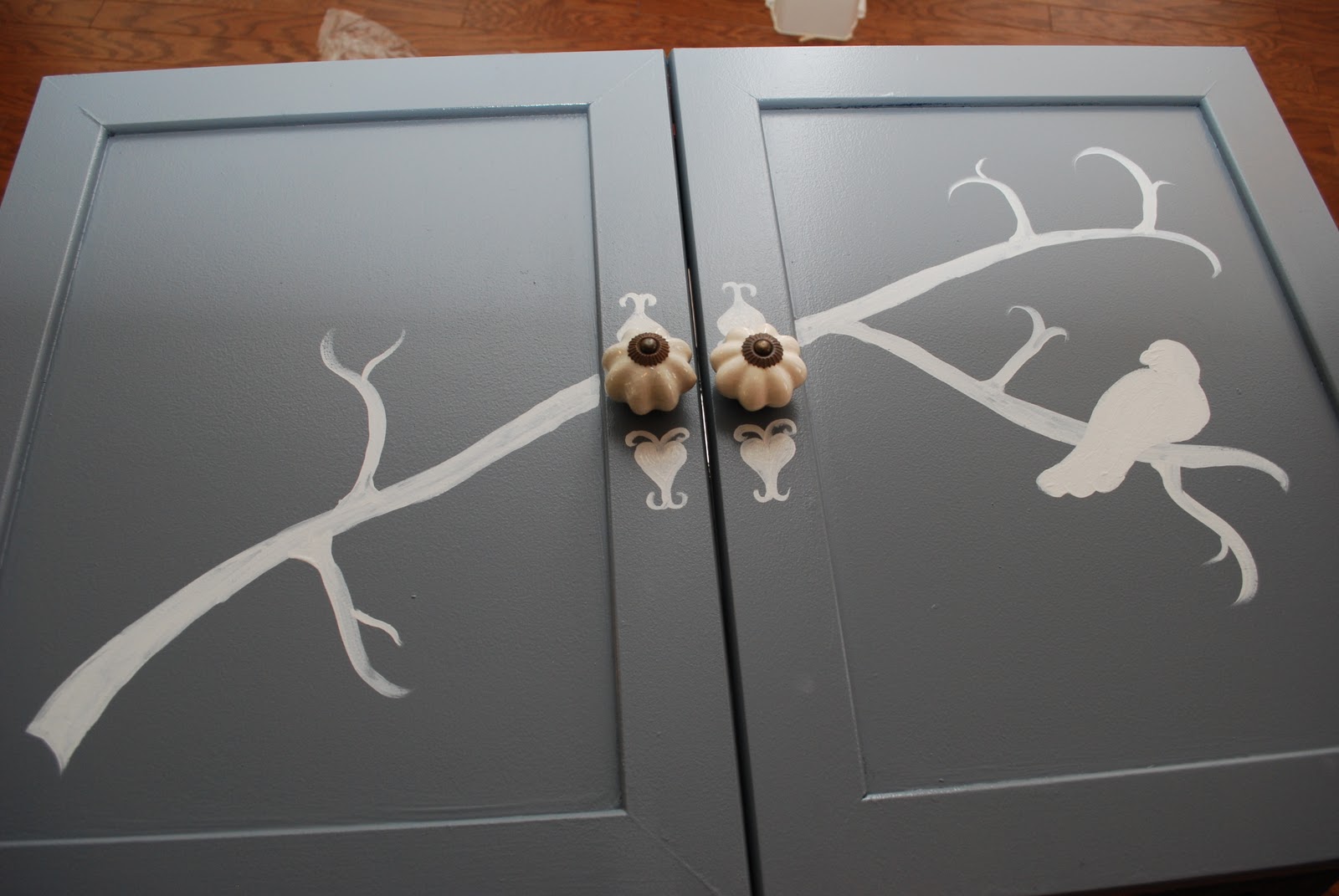
So anywho, here is the before picture of the hutch that I transformed. It's seen better days don't ya think?
 I purchased some "oops" paint for $3 at Lowes. This was the most frustrating paint. It took 3 full days to dry. I have had problems with this brand before, but at the time of purchase, I was only paying attention to the price tag and the color. 
 Here is the contrast between the old color and the new.
 The doors are my favorite part of this piece. The tree branch silhouette is just some swirly brush strokes. Very easy. The bird took a little more concentration. I was terrified that this poor little bird would be disproportionate and that I would have to repaint the door with the base color that wouldn't dry. THANKFULLY, I got it right the first time:o)
 I purchased this stencil from Hobby Lobby for around $1. I closed the store down that night. I had just finished a client's hair(7:30 p.m.) and raced out my driveway to get to H.L. before they closed which is at 8 p.m. 
Stenciling is time consuming, but I think adds a little something.

 I really like how it turned out. Thankfully there were enough of you voters out there who felt the same way, lol.
Now, to finish my next 2 projects. One will be for the competition and one is a "just because" project. I think you'll like it;o)
Have a great Wednesday!!

Tuesday, January 25, 2011

Google Boost: Now Appearing On Mobile Phones


(Cross-posted from LatLong)

Back in October we announced Google Boost, a new advertising solution to help local businesses connect with potential customers in their area. Today we are excited to announce that Boost ads can appear on Google Search results pages on Android and iPhone devices.


Consumers increasingly use mobile devices to search for products and services, and Boost will give advertisers the opportunity to reach these customers exactly when they are looking for local businesses on their phones. This feature will automatically take effect for current and future Boost advertisers.

In case you aren’t familiar with Boost, it’s Google's new advertising product that helps business owners quickly create an online advertising campaign that targets local customers. Using information from the business’s free Google Places listing, Boost automatically suggests and creates text ads that appear on Google Search and Google Maps results pages.

Google Boost is now available in all U.S. cities to select business types. To find out if your business is eligible, sign in to your Places account (or create a free one if you haven’t yet) and visit the Dashboard. If Boost is not currently available to your business, fill out this short form and we’ll notify you when it is.

Posted by Kiley McEvoy, Product Manager

Barbie Birthday Party Inspiration

S.R.'s 3rd Birthday is quickly approaching, early March to be exact. I started planning her party as soon as Christmas said AMEN:o) 
S.R. loves Barbie. So do I for that matter, what girl doesn't??
Anywho, she is finally grasping the concept of birthday parties and is super psyched about this year. I LOVE IT! 
For those of you who know me, birthdays and party planning are a big to-do in our household. The hubs is never that pumped about it, but I L-O-V-E to plan parties.
I started searching for Barbie themed parties and ran across 
 THIS over at The Party Dress.
This site has TONS of fabulous ideas for any kind of party. This is definitely the "go-to" place for party ideas.
 This is exactly what I was looking for. More of a vintage theme than a modern day Barbie. I have already started buying some great decorations and such for this party and there are going to be  A LOT of similarities.
Why mess with perfect?:o) 
I found Barbies on sale at Walmart the other day for $5.50 each. They came with tons of accessories. Those will be some of the party favors. 
I am really excited about it if you can't tell;o)
****
Make sure to cast your vote HERE for Crafting with the Stars. Voting ends tonight. Keeping my fingers crossed that I move on to the next round!!
Happy Tuesday!